Stitch Pro
Publisher Description

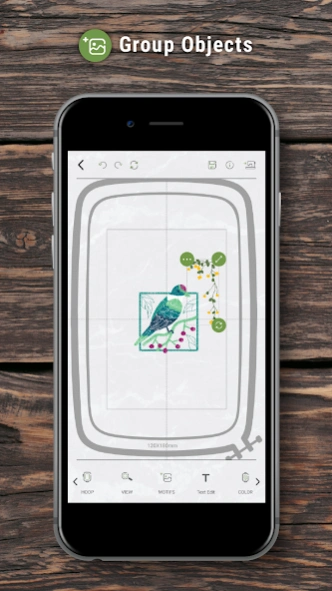


Importing and Creating your favorite designs and connect with machine via Wi-Fi.
[Abundant Embroidery Patterns]
Plant / People / Totem / Sport / Festival .....We provides various embroidery patterns for different categories. People can find what they want and enjoy the lovely designs.
[Friendly UI]
Forget about the small and unclear screen on your machine. Now you can use your mobile device (cellphone/pads) to create your wanted patterns with more freedom. We also provides basic tools for users to customize the patterns for their own demands.
[Wi-Fi support]
With Wi-Fi connection, you can monitor the current embroidering progress without keeping sitting in front of your machine. It notify the users the remaining time for embrodering and the current status.
[Editing Tools]
Stitch Pro provides a series of tools to allow users to import other embroidery files, change the thread color, rotate the patterns without limitation and a lot more.
About Stitch Pro
The company that develops Stitch Pro is Zeng Hsing Industrial Co., Ltd.. The latest version released by its developer is 1.0 .
To install Stitch Pro on your Android device, just click the green Continue To App button above to start the installation process. The app is listed on our website since 2026-07-22 and was downloaded 4 times. We have already checked if the download link is safe, however for your own protection we recommend that you scan the downloaded app with your antivirus. Your antivirus may detect the Stitch Pro as malware as malware if the download link to com.zenghsing.StitchPro is broken.
How to install Stitch Pro on your Android device:
- Click on the Continue To App button on our website. This will redirect you to Google Play.
- Once the Stitch Pro is shown in the Google Play listing of your Android device, you can start its download and installation. Tap on the Install button located below the search bar and to the right of the app icon.
- A pop-up window with the permissions required by Stitch Pro will be shown. Click on Accept to continue the process.
- Stitch Pro will be downloaded onto your device, displaying a progress. Once the download completes, the installation will start and you'll get a notification after the installation is finished.
Program Details
System requirements
Download information
Pricing
Version History
version
posted on 2026-07-22
Target SDK changed to 37
version
posted on 2026-04-14
Extend the waiting time for determining connection failure
version
posted on 2026-03-31
Fix bug
version
posted on 2024-08-11
Target SDK changed to 35
version
posted on 2024-08-04
Target SDK changed to API 34
version
posted on 2020-09-01
1.Fix editing issues.
2.Add web link to guide page.
